 Pistamix
Tools · Free beta for Mac
Pistamix Mixer for the
Behringer XR18.
A Mac app that runs your Behringer XR18 digital mixer from the Mac and from any phone in the venue, and records every channel straight to the Mac. Made for restaurants, bars, churches and small venues where the mixer has to be easy to reach.
Free · macOS 10.15 or later · Intel and Apple Silicon
What it does
The whole mixer,
wherever you are.
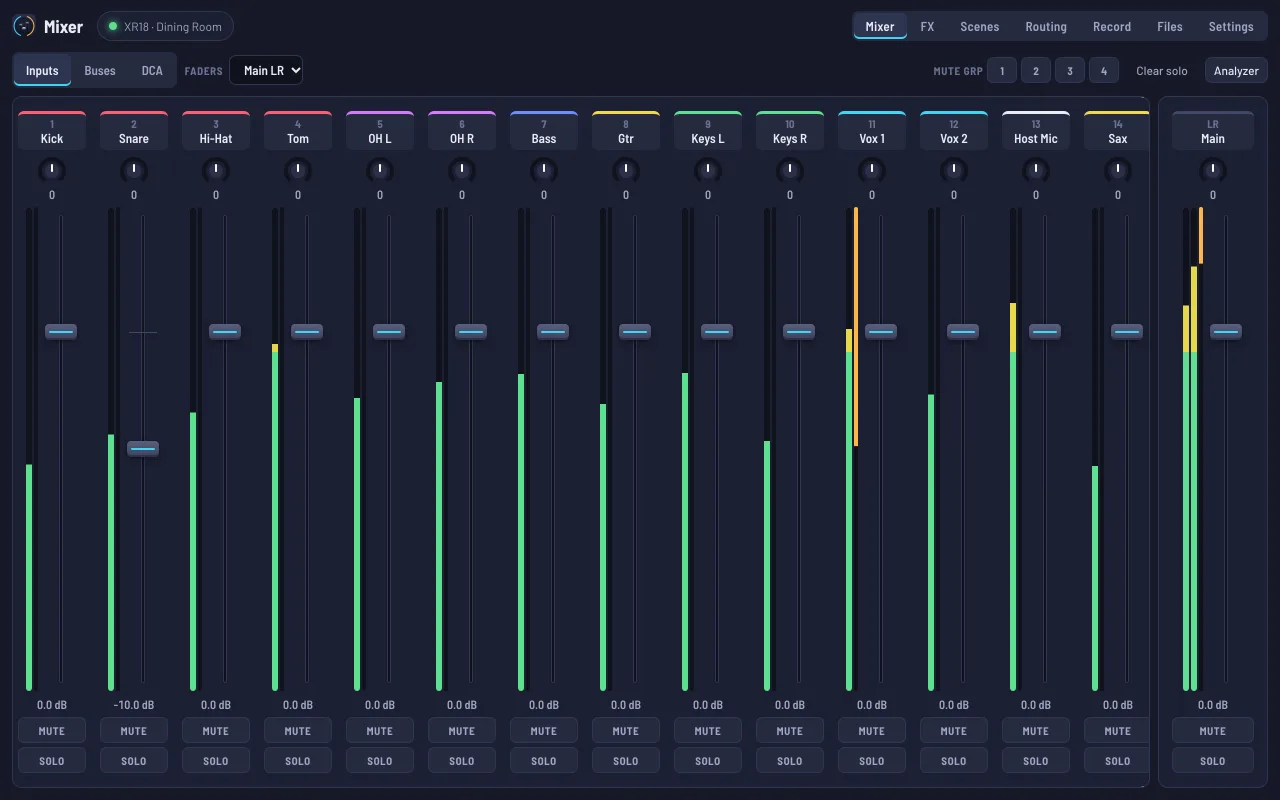
Most of what you’d do in Behringer’s X-AIR Edit, in a cleaner layout, plus recording to the Mac.
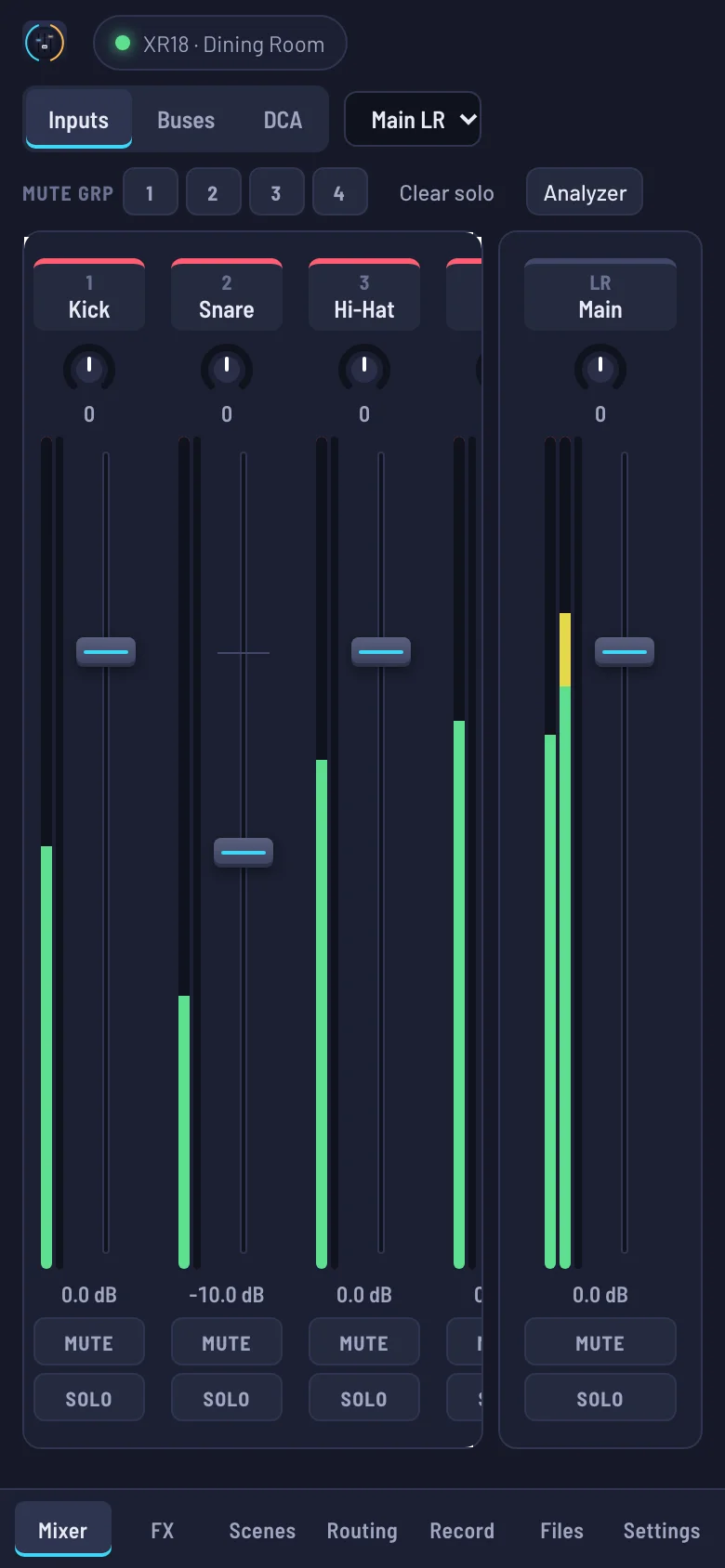
- Faders and monitor mixesEvery channel, bus, effect return and DCA, with meters, mute groups and solo. Pick a bus and the faders set that monitor mix instead.
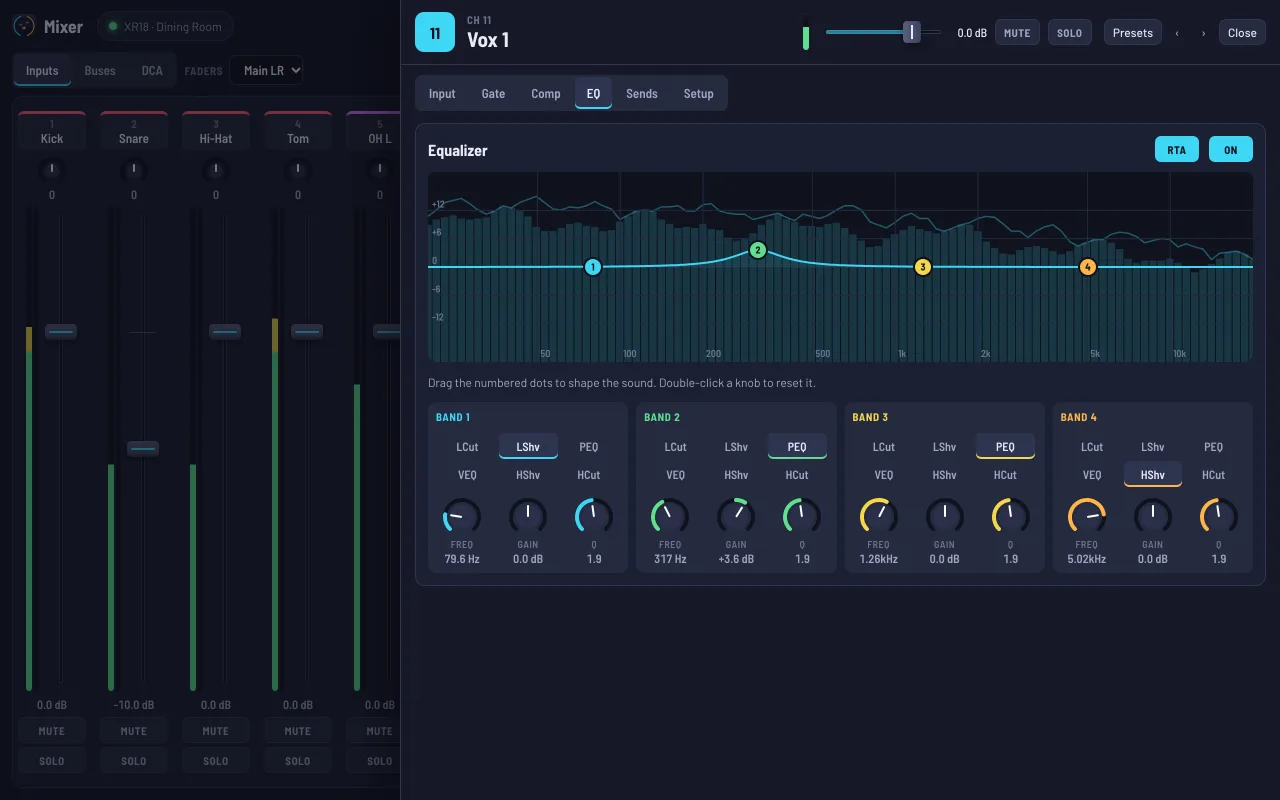
- Every channel settingGain and 48V, low cut, gate, compressor, a 4-band EQ you drag on a curve, and a 31-band graphic EQ on the buses and main mix.
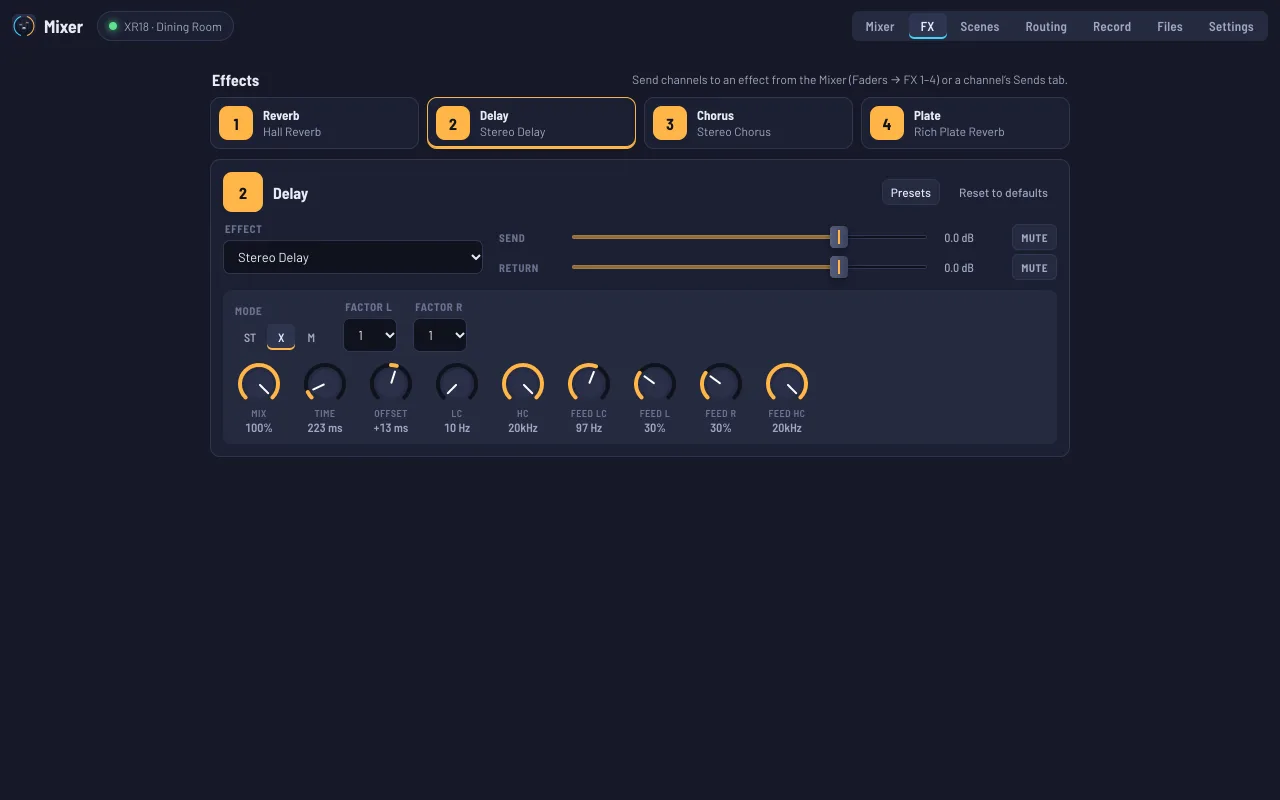
- All 61 effectsReverbs, delays, choruses, compressors and more, with every one of their settings, in the mixer’s four effect slots.
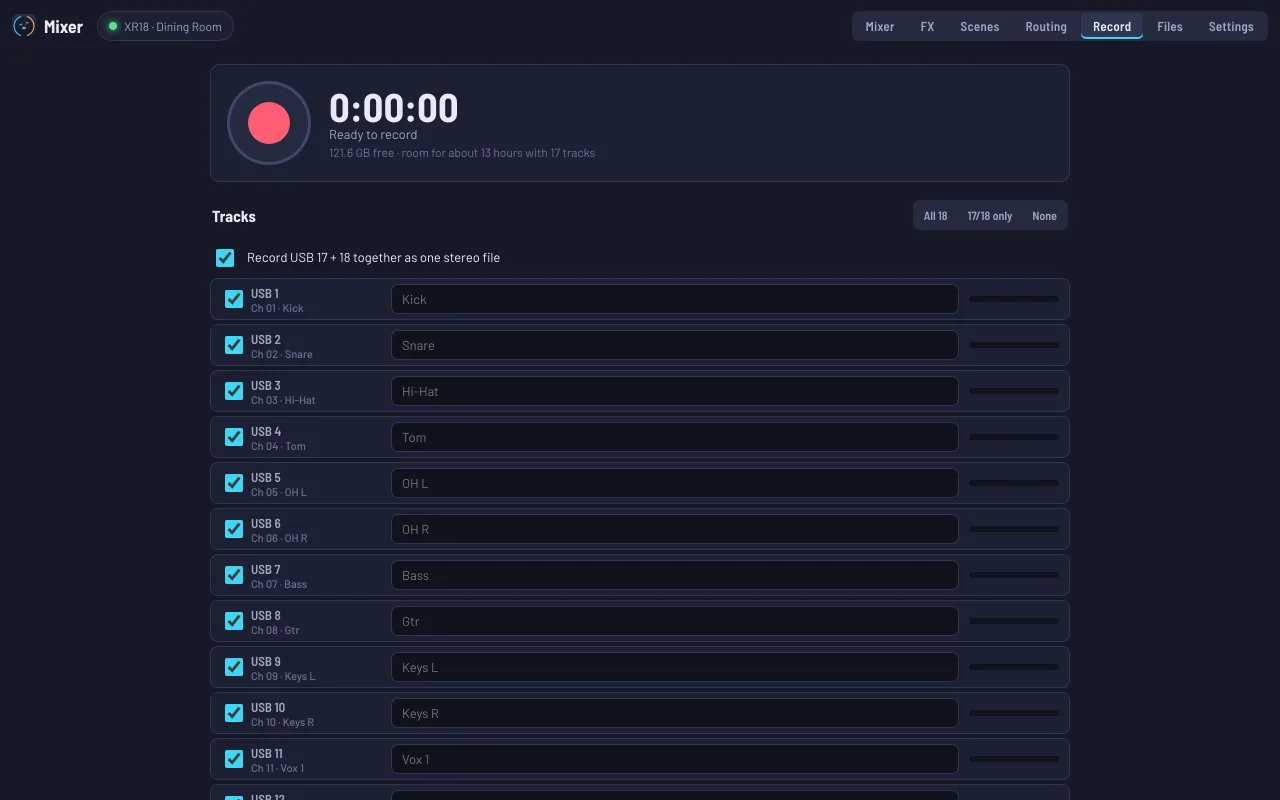
- Record every channelAll 18 USB channels to separate WAV files on the Mac, or just the main mix in stereo. Play and download them from any device.
- AnalyzerA live spectrum of any channel or the main mix, also drawn behind the EQ, so feedback and boomy notes are easy to find and pull down.
- Scenes, presets and backupsThe mixer’s 64 scenes, plus channel and effect presets and complete backups saved on the Mac. Restore everything after a band changes it.
Also: routing of USB, outputs, Ultranet and inputs, stereo linking, and mixer and network setup.
Phones and tablets
No app to install.
Just a browser.
The Mac shares the controls with any phone, tablet or computer on the same network. Staff log in with a password you set. Two people can mix at once and see each other’s changes.
Compatible hardware
What it works with.
Pistamix Mixer speaks the network control language of Behringer’s X AIR family and records through the mixer’s USB audio interface.
Supported
- Behringer XR18
The mixer Pistamix Mixer is built for: 16 mic inputs, an aux input, four effects, six buses, and an 18 × 18 USB audio interface for recording.
Should work, not tested yet
- Behringer X18
- Midas MR18
Same engine, channels and USB interface as the XR18, in a different box. If you try one, tell us how it goes.
Not supported
- Behringer XR12
- Behringer XR16
- X32, M32, Wing
The XR12 and XR16 have a different channel layout. The X32, M32 and Wing consoles use a different control language.
The Mac
- Intel or Apple Silicon, including older MacBook Airs.
- macOS 11 Big Sur or later, or macOS 10.15 Catalina with the edition for older Macs.
- A USB cable to the mixer’s USB port, only for recording. The mixer’s USB interface must be set to 18 × 18 (Pistamix Mixer’s Settings can do it).
- Disk space for recordings: about 1 GB per hour for the stereo main mix, 9 GB per hour for all 18 channels.
- The Mac must stay on while it’s in use. Pistamix Mixer keeps it from going to sleep.
The network and phones
- The mixer and the Mac on the same network: a router by Ethernet or Wi-Fi, or the mixer’s own Wi-Fi hotspot.
- Phones and tablets: iPhone, iPad and Android, in Safari or Chrome. Any computer with a current browser works too.
- Away from the venue, phones reach the Mac through a private VPN such as Tailscale. No router changes needed.
- Works alongside X-AIR Edit and Behringer’s phone app. Changes made in any of them show up everywhere.
Beta. Pistamix Mixer is built on Behringer’s published X AIR control protocol and has been tested against a simulated XR18, but not yet on a real mixer in a venue. Try it during a soundcheck before you rely on it for a show. X-AIR Edit keeps working the whole time if you need it.
Free beta
Get Pistamix Mixer for Mac.
Pick the version for your Mac’s system. Not sure? Open the Apple menu → About This Mac and look at the macOS version.
macOS 11 or later
For Macs on macOS 11 Big Sur or newer. One installer for both Apple Silicon and Intel.
Download for macOS 11+macOS 10.15 Catalina
For Macs that can’t update past Catalina, like many older MacBook Airs. The same app, built to run on 10.15.
Download for CatalinaInstalling and first launch
Pistamix Mixer is signed by FlamingSoft and notarized by Apple, so it installs like any other Mac app:
- Open the downloaded .pkg and follow the installer. Pistamix Mixer goes in your Applications folder.
- Open Pistamix Mixer. It finds the XR18 on the network by itself. Plug in the mixer’s USB to record, and allow microphone access when asked (macOS calls every audio input a microphone).
- In Settings, set a password. Then open the address Pistamix Mixer shows on any phone on the same Wi-Fi.
Questions
Is Pistamix Mixer made by Behringer?
No. Pistamix Mixer is an independent tool from the makers of Pistamix. It isn’t made, endorsed or supported by Behringer or Music Tribe.
Does it replace X-AIR Edit?
You can use either, or both at the same time. Pistamix Mixer covers day-to-day mixing, effects, scenes, routing and recording. Firmware updates for the mixer are still done with X-AIR Edit.
Do phones need an app?
No. Phones use their web browser. Open the address Pistamix Mixer shows on the Mac and log in with the password you set. You can add it to the home screen so it opens like an app.
Where do recordings go, and in what format?
To the Music folder on the Mac (under Mixer Recordings), or to any drive you choose in Settings, such as an external drive for long recordings, as 24-bit WAV files, one per track (or all the chosen tracks mixed into one stereo file, if you tick that on the Record screen). If that drive is unplugged or fills up mid-recording, the recording keeps going on the Mac without a gap, and Pistamix Mixer offers to move it to the drive once it’s back. Each recording also shows up in Pistamix Mixer’s Files tab, where you can play and download it from any device.
The one-file mix sounds clipped or distorted. What do I do?
The one-file mix adds the chosen channels together at their fader levels, so with many loud channels it can go over the top even when the room sounds fine. Any of these fixes it. Record the main mix instead: on the Routing screen, choose “Main mix → USB 17/18”, then pick “17/18 only” on the Record screen; that’s exactly what the room hears. Record in 32-bit float (Settings → Quality): 32-bit files don’t clip, so if a recording sounds too loud, lower its volume in an audio editor such as Audacity and the distortion goes away. Mix fewer channels, or bring the loudest faders down a little (the room hears that too). If a single track sounds clipped, its channel’s input gain is too high: turn it down until that track’s level bar on the Record screen stops turning red.
What happens if the Mac turns off?
The mixer keeps working on its own: the sound doesn’t stop. Phones just can’t reach it until Pistamix Mixer is open again on the Mac.
Is it free?
Yes, while it’s in beta.